
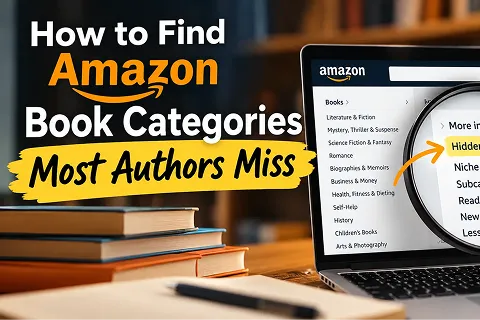
How to Find Amazon Book Categories Most Authors Miss
You spent months writing your book. You fixed the errors, chose a cover, and got it ready for sale. Now comes a big question. How
You spent months writing your book. You fixed the errors, chose a cover, and got it ready for sale. Now comes a big question. How will readers find it?
Many authors miss one small but key step. They pick broad Amazon categories without looking at other choices. So their books can be lost in thousands of titles.
Learning how to find Amazon Book Categories can help you avoid this problem.
Amazon has many book sections, and some are easy to miss. So, let’s look at ways to find the right ones.
Think about your last trip to a bookstore.
If you wanted a crime novel, you’d head to the mystery shelves. You wouldn’t spend hours searching the cookbooks.
Amazon works in a similar way.
Each category helps readers find books they may enjoy. However, some categories hold far more books than others.
For example, a small-town mystery may fit a broad crime fiction section. Yet, readers who enjoy cozy mysteries may look in a smaller group.
That’s why choosing the right shelf matters.
Amazon KDP lets authors pick up to three book categories. So, you have three chances to help readers find your work.
Most authors start with their book’s main genre. That’s a good first step, but don’t stop there.
Amazon has smaller groups within its main sections. Some of these may suit your book much better.
First, visit Amazon and open the Books or Kindle Store.
Then, find the category menu and choose your book’s main topic.
Let’s say you’ve written a book about healthy family meals.
You might want to take a look at the cooking, healthy eating, and family meals pages.
Then check the smaller groups under each subject.
You may find a more specific section that fits your book.
Also, write down any useful options. You can check them later.
A book can appeal to readers with different interests.
So, a story about a nurse in World War II might be labeled historical fiction.
But it may also be attractive to those interested in combat stories or women’s fiction.
So, think about what makes your book special.
Is it the setting, the main character, or the theme?
These details can lead you toward categories other authors may overlook.
You don’t have to start your research from scratch.
Other books can give you some helpful clues.
First, find five to ten books that are similar to yours.
Choose titles with similar genre, subjects, or intended readers.
Then, open each book’s Amazon page.
Scroll down to the product details and look for its Best Sellers Rank.
You may also see the categories where that book ranks.
For example, two books about personal growth may appear in different sections.
One might focus on building confidence. The other can be grief or mourning.
They’re all about the same subject, just for different readers.
Still, Amazon may not show every category linked to a book. Use these details as clues, not a full list.
Open a simple spreadsheet and record:
After checking several titles, look for patterns.
Do the same smaller categories keep appearing?
If they do, explore those sections further.
You may have searched for an Amazon categories list online.
That’s a fair place to start. However, older lists may not show today’s choices.
Amazon changes its book sections from time to time.
Also, Kindle books and print books don’t always have the same categories.
That’s why a list of all Amazon categories and subcategories may soon become outdated.
Instead, check Amazon’s official KDP category guide.
It explains how to choose and update categories.
You can also browse Amazon’s live bookstore to see current sections.
There’s no need to check every category. Focus on the ones that match your book.
Here’s something many authors get wrong.
They see a category with fewer books and think it’s an easy win.
But fewer books don’t always mean more readers.
Let’s say you’ve written a guide about growing vegetables at home.
You find a small category with little competition. However, it has almost nothing to do with gardening.
Would people browsing that section buy your book?
Probably not.
So, judge each category by three things:
A good category should make sense to your readers.
Next, open the bestseller lists for the categories you’re considering.
Look at the books near the top.
Are they close to yours in subject and style?
Do their covers and descriptions target the same readers?
Also, look at their Amazon sales ranks.
These can give you clues about buying activity.
However, sales ranks don’t show exact sales numbers.
So, don’t treat them as proof of how many books a category sells.
Book categories and keywords aren’t the same thing.
Categories help readers browse. Keywords help Amazon match books with search terms.
For example, someone may search for “cozy mystery set in a small town.”
That phrase tells you exactly what kind of story they want.
Good KDP category keywords should reflect such reader interests.
But keywords won’t force your book into an unrelated category.
Amazon looks at other book details too.
So, choose terms that describe your book.
Authors often use words that readers wouldn’t type into Amazon.
You may describe your novel as a story of personal change.
Yet, a reader may search for “family drama about two sisters.”
See the difference?
The second phrase tells Amazon more about the story.
To find useful keywords, ask yourself:
What would someone type to find my book?
Which problem does my book solve?
How would readers describe my story?
Then, use those answers to guide your research.
Sometimes, two categories sound alike but serve different readers.
For instance, a book on money problems could be a memoir or a finance handbook.
The topic is similar, but the purpose is different.
A memoir shares someone’s life. A finance guide teaches readers what to do.
So, think about what buyers expect.
When you explore Amazon categories books, check the titles within each section.
Read a few descriptions and look at their main themes.
Do those books offer the same kind of reading experience as yours?
If so, that category may deserve a place on your list.
Once you’ve done your research, narrow your choices.
Amazon KDP allows up to three categories during book setup.
So, start with the ones that best describe your book.
Then, check whether each choice appears in KDP’s category menu.
Not every category you see on Amazon will be available for your book.
Your format and marketplace can also affect the options.
And don’t select a weak category just to use all three slots.
It’s better to choose fewer relevant options than misleading ones.
Ready to make your choices?
Sign in to your KDP account and open your Bookshelf.
Then, follow these steps:
You can also change your categories after publishing.
However, Amazon may take up to 72 hours to show the updates.
Many authors overlook simple things during category research.
Here are some mistakes to avoid:
Also, don’t rely only on an Amazon books categories search.
Open the actual category pages and study the books there.
A name may sound right, but the books could target very different readers.
Finding the right categories takes some time, but the process is simple.
Start with your genre. Then, look at similar books and explore smaller sections.
Most importantly, choose categories your readers would visit.
Of course, categories are only part of the work.
Your book also needs a clear description, a good cover, and careful editing.
WestBow Publishers offers book publishing services for authors who want support preparing their work for readers.
With the right choices, you can give your book a better chance of being found.
Turn your finished manuscript into a professionally published book with expert support.
They help the right readers locate your book. But sales also depend on your cover, your description, and reader interest.
You can choose up to three categories. Your choices will depend on the format of your book and the marketplace.
Yes. You can change them through KDP. However, updates may take up to 72 hours to appear.
You can publish independently. But good guidance can make editing, design, and book setup easier.
WestBow Publishers gives publication support to authors. You can look through its offerings to see if there's one that works for your book.
Recent Posts
You spent months writing your book. You fixed the errors, chose a cover, and got it ready for sale. Now comes a big question. How

Writing a book is a process of time, heart and hard work. But writing your book is merely the beginning. Now you have to help
You have finished writing your book. Now comes a choice that could shape its future. Should you publish it yourself, find a publisher, or choose